
 Jane Hill
Google itself promoted this week’s pre-I/O Android event as the biggest Android update ever. This week, they introduced many new things, from Android 17 to a refreshed Android Auto and Google Books.
The Android Show I/O Edition 2026 saw Google reveal the new Googlebook and Gemini Intelligence. Google has now shown the biggest upgrades coming in its next operating system update during its special Android Show before next week’s large I/O developer event. The Android software announcements also included a preview of upcoming Android-powered Googlebook laptops and many Android Auto improvements.
Gemini Intelligence & Task Automation
Google is launching a feature called Gemini Intelligence. It can smoothly work with all your apps and perform exactly what you ask. Everything runs in the background, so you can continue using your phone while Gemini handles the tasks.
They spent many months improving multi-step automation features on the Galaxy S26 and Pixel 10 with popular food and ride apps to make every action feel smooth and natural. Task Automation is already available for food delivery and rideshare apps on the newest Samsung and Google flagship phones.
One promo video shows a man taking a photo of a concert poster and messaging someone about it. After both agree to attend, Gemini Intelligence displays a button saying ” Book two floor seats for this concert. You tap the button, it shows buying tickets, and then confirms that the tickets have been purchased. Many people online said they would not trust such a button. Google later explained that the real checkout process would include more steps, but they could not include everything in the short promo clip.
Rambler
Rambler is one of the more useful features. It is a smart live transcription tool that removes filler words such as “um” and “ah,” shortens your message, and fixes mistakes automatically.
It removes unnecessary words like “um” and “like” and neatly combines your speech into one clear and understandable message.
Rambler clearly informs users when it is active to convert voice into text. Audio is only used for live transcription and is not stored or saved. It may especially help multilingual users because it can switch between different languages inside the same message.
Create My Widget & Gemini in Chrome
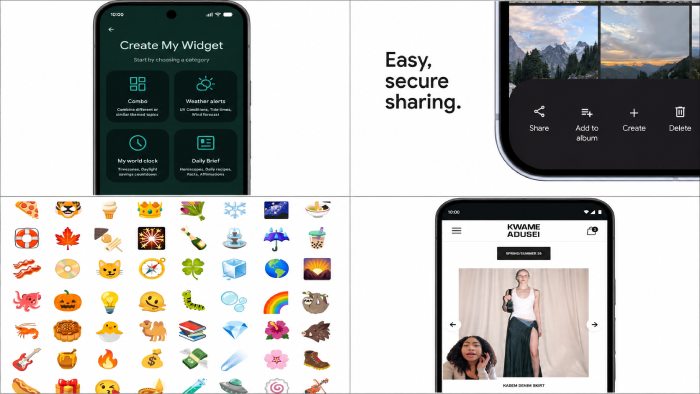
Create My Widget allows users to make custom home screen widgets using natural language. Google showed examples such as a meal planner suggesting high-protein recipes, a cycling weather widget focusing on wind speed and rain, or a live feed showing upcoming performances at a nearby concert location.
Normally, creating a custom widget can take a lot of time because users need to choose the right app, adjust settings, and customize everything manually. If the system can build the widget automatically from a simple request, it becomes much easier.
Gemini Intelligence also includes an updated design style based on Material 3 Expressive. The new visual system is designed to look attractive while helping reduce distractions through purposeful animations.
One of the most notable Chrome features is Auto Browse. For example, if you forget to reserve parking before going to a comedy event, Chrome can use information from your ticket confirmation and automatically find a parking space through SpotHero.
Creator Tools, Instagram & Screen Reactions
Google explained that Android 17 updates are designed to help creators focus more on important work.
Google also announced several expected upgrades for Instagram on Android, developed together with Meta to improve the full user experience. The Instagram experience on Android phones is expected to become smoother and more polished.
With Screen Reactions, users appear as a cutout in front of their screen while recording content such as photos, videos, or web pages. Android 17 will also add support for the APV video format on flagship phones powered by the Snapdragon 8 Elite Gen 5 chipset, including devices like the Samsung Galaxy S26 Ultra and vivo X300 Ultra.
Pause Point & New Emoji
Google has redesigned Android’s entire emoji collection, including all 4,000 emoji. The updated emoji now look more three-dimensional with improved depth and extra detail compared to the older cartoon-like versions.
When opening a distracting app, Pause Point gives users a 10-second pause to rethink why they opened it. It also allows setting a timer for app usage during each session. While it may or may not work better than other screen-time tools, it offers a fresh approach.
Android Auto Overhaul
The updated Android Auto appears similar to the detailed navigation style seen in Apple Maps comparisons. It now includes building shapes, flyovers, and detailed lane guidance to help drivers stay in the correct lane during navigation.
If a friend asks for your address in chat, the system can automatically use details from navigation and messages to suggest the address instantly. Users only need to tap the suggestion instead of typing everything manually.
Users can also watch full-screen HD YouTube videos on the car display while parked. Once driving starts, the video smoothly disappears and changes into background podcast-style audio to avoid distraction.
Googlebook & Android Beta
Google Books is not a single laptop created only by Google. Instead, it represents a new generation of Chromebooks produced by companies such as HP, Dell, Lenovo, Acer, and Asus. One major feature is the AI-powered cursor, which works like a multimodal gateway for Gemini features. The back side also includes an RGB glowing light bar.
To install Android 17 on a supported Google Pixel device, users can join the Android Beta for Pixel program. The Android 17 system image is named Baklava. Live threat detection uses on-device AI to monitor app behavior and warn users if an app starts acting in a suspicious way.