
 Jane Hill
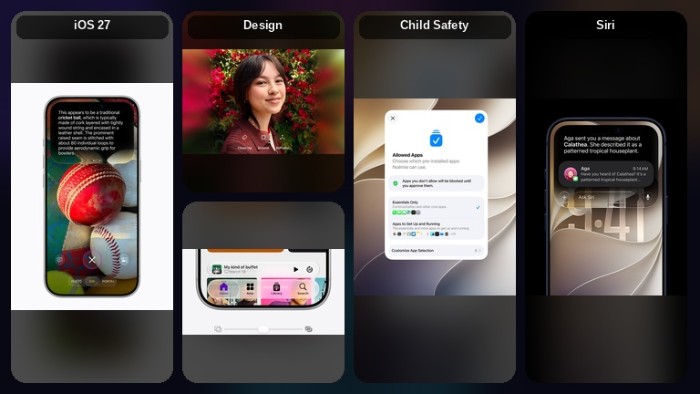
Apple introduced iPhone iOS 27 on June 8, 2026. Users can download the beta version from the developer mode. A public release is expected in September 2026 alongside the iPhone 18 series.
The Top Features of Apple iPhone iOS 27
The iOS 27 update is based on Siri and Apple Intelligence. Apple devices were lacking in this area, but now, through a collaboration with Google, they have improved the AI system.
Design & Performance
iOS 27 introduces an improved Liquid Glass design with changes that make text easier to read. It provides better color contrast and more uniform lighting. App icons look clearer and more detailed. A new slider allows you to adjust the Liquid Glass appearance, from very clear to fully colored.
Performance across iOS is also quicker. Apps open up to 30% faster, new photos appear in your Photos library up to 70% faster, and AirDrop transfers are up to 80% faster.
Apple continues to support all devices that work with iOS 26. If your device can run iOS 26, it will also be able to install iOS 27 when it launches in the fall.
All-New Siri AI
Siri AI is powered by Apple Intelligence and is more useful than before. Complete everyday tasks more easily with better answers, more natural conversations, and a new dedicated app.
Siri AI can perform actions in apps such as Messages, Music, Reminders, and others based on what you are doing. You can quickly edit a message you just sent or add a song you hear while driving to your workout playlist.
The new Siri app keeps all your conversations in one place. It allows you to start a question on your iPhone and continue it on your iPad.
You can also customize Siri’s voice, expression, and speaking speed to match your preference.
AI Photo Editing
You can change the framing of a photo after taking it with Spatial Reframing. Now make your pictures larger with the Extend tool, and remove bigger unwanted objects with the improved Clean Up tool.
You can touch and drag the image, and the view changes as if the camera was moved when the photo was originally taken. This feature uses on-device spatial technology. It allows you to see changes instantly.
Siri Mode in Camera
Siri Mode and Visual Intelligence let you search, ask questions, and perform actions based on what is around you with a single tap.
Apple Intelligence in Apps
Tabs can now be grouped automatically by topic, making related pages easier to find. Safari Notify Me watches webpages for updates, such as price changes or restocks, and alerts you when something changes.
The Passwords app warns you about weak or unsafe passwords and can update them for you automatically.
You can automate everyday tasks with a simple description. You just need to explain what you want, and Shortcuts links actions across different apps to complete the task. For example, you can say, “When I leave work, send Pedro a message that I’m on my way and include my arrival time.”
Call Context can automatically show useful information from your apps when calling a business, such as a confirmation code from Mail when contacting an airline.
Image Playground
Create unique, high-quality images in many different styles, including realistic ones. You can also improve and change images using simple text descriptions.
Child Safety
New and expanded child safety tools make it easier for parents and guardians to help keep children safe while using an iPhone.
With Ask to Browse, children must request permission before visiting new websites. Parents can review the request in Messages before allowing access.
Communication Safety helps protect children from viewing or sharing nudity in Messages, FaceTime, and other apps. It can also warn children before they see violent or graphic content in shared photos and videos.
Parents can set time limits for categories such as Entertainment, Games, and Social Media.